
Home IoT Hub Series · 22
Part 22 — ESP32 upgrade: powering up the brain with a touch TFT + Bluetooth
In Part 21 we upgraded to a TFT display. But we ran out of GPIO. No pins left for touch, backlight PWM had to be sacrificed, and wiring a sensor node straight into the brain was out of the question.
The reason is simple. We've hit the ceiling of the ESP8266. It's time to move the brain up to an ESP32.
ESP8266 vs ESP32
| Spec | ESP8266 (NodeMCU) | ESP32 (DevKit v1) |
|---|---|---|
| CPU | 80MHz single-core | 240MHz dual-core |
| RAM | 50KB | 520KB |
| Flash | 4MB | 4MB |
| GPIO | 9 | 24 |
| SPI | 1 (software) | 2 (hardware) |
| I2C | 1 | 2 |
| ADC | 1 channel, 10-bit | 18 channels, 12-bit |
| Touch pins | None | 10 (capacitive) |
| Wi-Fi | 2.4GHz b/g/n | 2.4GHz b/g/n |
| Bluetooth | None | BLE 4.2 + Classic |
| Price (approx. USD) | ~$1.70 | ~$2.70 |
IoT_Hub_Net.Parts and cost
| Part | Qty | Price (approx. USD) | Notes |
|---|---|---|---|
| ESP32 DevKit v1 | 1 | ~$2.70 | 30-pin version |
| ILI9341 TFT (with XPT2046 touch) | 1 | ~$4.70 | If you bought the no-touch version in Part 21, replace the whole thing |
| Piezo buzzer | — | reuse existing | |
| Jumper wires (female-female) | 12 | — | |
| Total | ~$7.40 |
Pin wiring
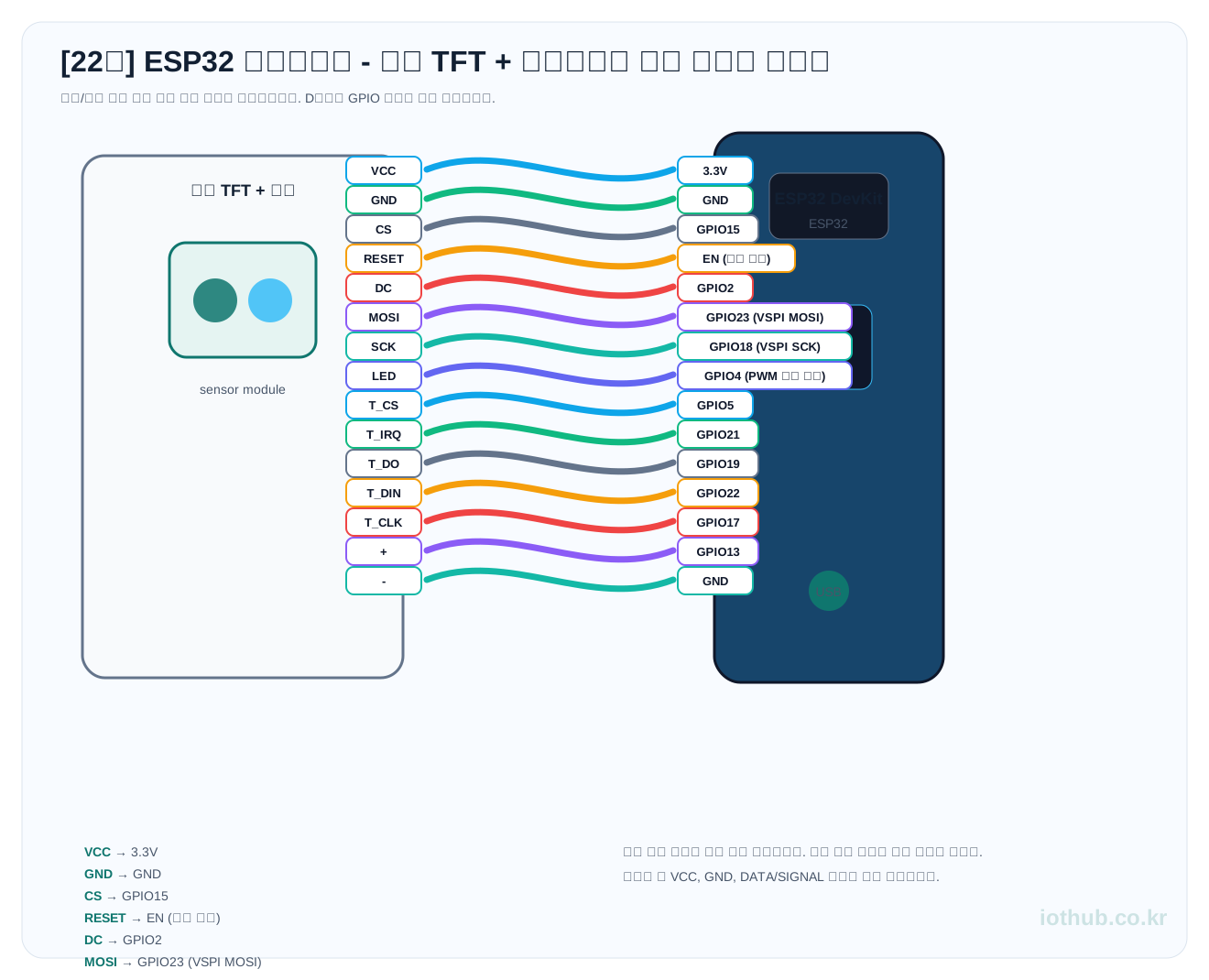
The ESP32 has pins to spare. Wire up the TFT (SPI) + touch (its own separate SPI) + buzzer and you still have 10-plus pins left over.
| Sensor/Module | Board pin |
|---|---|
| VCC | 3.3V |
| GND | GND |
| CS | GPIO15 |
| RESET | EN (shared reset) |
| DC | GPIO2 |
| MOSI | GPIO23 (VSPI MOSI) |
| SCK | GPIO18 (VSPI SCK) |
| LED | GPIO4 (PWM brightness control) |
| T_CS | GPIO5 |
| T_IRQ | GPIO21 |
| T_DO | GPIO19 |
| T_DIN | GPIO22 |
| T_CLK | GPIO17 |
| + | GPIO13 |
| - | GND |
Prep work
1. Install the ESP32 board manager: add the URL under Arduino IDE Preferences → Additional Boards Manager URLs, then install ESP32 from the Boards Manager.
https://raw.githubusercontent.com/espressif/arduino-esp32/gh-pages/package_esp32_index.json
2. Libraries: TFT_eSPI, XPT2046_Touchscreen
3. TFT_eSPI User_Setup.h: edit it in the library folder as below.
#define ILI9341_DRIVER
#define TFT_CS   15
#define TFT_DC   2
#define TFT_RST  -1
#define TFT_MOSI 23
#define TFT_SCLK 18
#define TFT_BL   4
#define SPI_FREQUENCY 40000000
🚨 Before you upload — do this first!!
Change the Wi-Fi SSID/password to your own router's details — the YOUR_SSID and YOUR_PASSWORD parts. If you don't, it won't connect to Wi-Fi.
const char* ssid     = "YOUR_SSID";
const char* password = "YOUR_PASSWORD";
Full code
Below is the complete code, nothing left out. Copy this one file into the Arduino IDE, change only the SSID/password, and upload it to the ESP32.
#include <WiFi.h>
#include <WebServer.h>
#include <TFT_eSPI.h>
#include <XPT2046_Touchscreen.h>

// =============================================
// 1. Wi-Fi settings (fill these in!)
// =============================================
const char* ssid     = "YOUR_SSID";
const char* password = "YOUR_PASSWORD";
const char* ap_ssid     = "IoT_Hub_Net";
const char* ap_password = "iothub1234";

// =============================================
// 2. Hardware pins
// =============================================
#define BUZZER_PIN 13
#define TFT_BL     4

TFT_eSPI tft = TFT_eSPI();
WebServer server(80);

#define TS_CS  5
#define TS_IRQ 21
XPT2046_Touchscreen ts(TS_CS, TS_IRQ);

// =============================================
// 3. 20 memory slots
// =============================================
#define SLOT_COUNT 20
String slot[SLOT_COUNT] = {
  "--", "--", "--", "--", "--",
  "--", "--", "--", "--", "--",
  "--", "--", "--", "--", "--",
  "--", "--", "--", "--", "--"
};

const char* label[SLOT_COUNT] = {
  "Living Temp","Living Hum","Outside Temp","AC",
  "Boiler","Stove","Gas Leak","Fire",
  "Front Door","Door Lock","Living Light","Fridge Temp",
  "CO2","Dust PM2.5","Power","Water",
  "Hot Water","Rain","Bath Hum","Pet Bowl"
};

// =============================================
// 4. Colors
// =============================================
#define C_BG       TFT_BLACK
#define C_TITLE_BG TFT_WHITE
#define C_CARD     TFT_DARKGREEN
#define C_CARD_WARN TFT_RED
#define C_LABEL    TFT_SILVER
#define C_VALUE    TFT_YELLOW
#define C_LINE     TFT_WHITE

// =============================================
// 5. Timers
// =============================================
unsigned long lastScroll = 0;
unsigned long lastBuzzer = 0;
int scrollOffset = 0;
const int ITEMS_PER_PAGE = 4;
const int SCROLL_INTERVAL = 3000;
bool warningActive = false;

// =============================================
// 6. Storage for touch card zones
// =============================================
struct CardZone {
  int x, y, w, h, slotIdx;
};
CardZone cards[4];

// =============================================
// setup
// =============================================
void setup() {
  Serial.begin(115200);

  pinMode(BUZZER_PIN, OUTPUT);
  digitalWrite(BUZZER_PIN, LOW);

  // TFT
  tft.init();
  tft.setRotation(1);
  tft.fillScreen(C_BG);
  tft.setTextWrap(false);

  // Backlight PWM (ESP32 only)
  ledcSetup(0, 5000, 8);
  ledcAttachPin(TFT_BL, 0);
  ledcWrite(0, 200);

  // Touch
  ts.begin();
  ts.setRotation(1);

  // Boot logo
  tft.setTextColor(TFT_WHITE, C_BG);
  tft.drawString("ESP32 IoT Hub", 40, 140, 4);
  tft.drawString("iothub.co.kr", 60, 180, 2);
  delay(1000);

  // Wi-Fi AP+STA
  WiFi.mode(WIFI_AP_STA);
  WiFi.begin(ssid, password);

  tft.fillScreen(C_BG);
  tft.drawString("WiFi connecting...", 30, 100, 2);
  Serial.print("Connecting to WiFi");
  int dots = 0;
  while (WiFi.status() != WL_CONNECTED) {
    delay(500);
    Serial.print(".");
    tft.drawString(".", 180 + dots * 8, 100, 2);
    dots++;
  }
  Serial.println();
  Serial.print("STA IP: "); Serial.println(WiFi.localIP());

  WiFi.softAP(ap_ssid, ap_password);
  Serial.print("AP  IP: "); Serial.println(WiFi.softAPIP());

  // Web server
  server.on("/set", handleSet);
  server.on("/", handleRoot);
  server.on("/status", handleStatus);
  server.onNotFound(handleNotFound);
  server.begin();

  // Show IP
  tft.fillScreen(C_BG);
  tft.drawString("ESP32 IoT Hub Ready", 20, 30, 4);
  tft.drawString("LAN: " + WiFi.localIP().toString(), 10, 80, 2);
  tft.drawString("AP : " + WiFi.softAPIP().toString(), 10, 110, 2);
  delay(3000);
}

// =============================================
// loop
// =============================================
void loop() {
  server.handleClient();
  handleTouch();
  updateTFT();
  updateBuzzer();
}

// =============================================
// Check warning state
// =============================================
bool checkWarning() {
  for (int i = 0; i < SLOT_COUNT; i++) {
    if ((i == 6 || i == 7 || i == 8)
        && slot[i] != "0" && slot[i] != "--") return true;
    if (i == 19 && slot[i] != "--" && slot[i].toInt() < 50) return true;
  }
  return false;
}

// =============================================
// Buzzer control
// =============================================
void updateBuzzer() {
  warningActive = checkWarning();
  if (warningActive) {
    unsigned long now = millis();
    if (now - lastBuzzer < 500) return;
    lastBuzzer = now;
    digitalWrite(BUZZER_PIN, !digitalRead(BUZZER_PIN));
  } else {
    digitalWrite(BUZZER_PIN, LOW);
  }
}

// =============================================
// GET /set?no1=value&no2=value ...
// =============================================
void handleSet() {
  int updated = 0;
  for (int i = 1; i <= SLOT_COUNT; i++) {
    String paramName = "no" + String(i);
    if (server.hasArg(paramName)) {
      slot[i - 1] = server.arg(paramName);
      updated++;
    }
  }
  server.send(200, "application/json", "{\"updated\":" + String(updated) + "}");
}

// =============================================
// GET / → HTML dashboard
// =============================================
void handleRoot() {
  String html = "<!DOCTYPE html><html lang=\"ko\"><head>"
  "<meta charset=\"UTF-8\">"
  "<meta name=\"viewport\" content=\"width=device-width,initial-scale=1.0\">"
  "<title>IoT Hub ESP32</title>"
  "<style>"
  "*{margin:0;padding:0;box-sizing:border-box;}"
  "body{font-family:system-ui,sans-serif;background:#1a1a2e;color:#eee;padding:16px;}"
  "h1{text-align:center;font-size:1.3rem;margin-bottom:4px;color:#e94560;}"
  ".sub{text-align:center;font-size:0.7rem;color:#555;margin-bottom:16px;}"
  ".grid{display:grid;grid-template-columns:repeat(auto-fill,minmax(185px,1fr));gap:10px;}"
  ".card{background:#16213e;border-radius:8px;padding:12px;border-left:4px solid #0f3460;}"
  ".card.warn{border-left-color:#e94560;background:#1c0e1a;}"
  ".card .no{font-size:0.6rem;color:#555;margin-bottom:2px;}"
  ".card .label{font-size:0.8rem;color:#a0a0b0;margin-bottom:4px;}"
  ".card .value{font-size:1.2rem;font-weight:700;}"
  ".footer{text-align:center;margin-top:16px;font-size:0.7rem;color:#444;}"
  "</style></head><body>"
  "<h1>IoT Hub</h1><div class=\"sub\">ESP32 + Touch TFT</div>"
  "<div class=\"grid\">";

  for (int i = 0; i < SLOT_COUNT; i++) {
    bool isWarn = false;
    String val = slot[i];
    if ((i == 6 || i == 7 || i == 8) && val != "0" && val != "--") isWarn = true;
    if (i == 19 && val != "--" && val.toInt() < 50) isWarn = true;
    html += "<div class=\"card" + String(isWarn ? " warn" : "") + "\">";
    html += "<div class=\"no\">#" + String(i + 1) + "</div>";
    html += "<div class=\"label\">" + String(label[i]) + "</div>";
    html += "<div class=\"value\">" + val + "</div></div>\n";
  }

  html += "</div><div class=\"footer\">ESP32 IoT Hub | iothub.co.kr</div></body></html>";
  server.send(200, "text/html; charset=utf-8", html);
}

// =============================================
// GET /status → JSON
// =============================================
void handleStatus() {
  String json = "{";
  for (int i = 0; i < SLOT_COUNT; i++) {
    if (i > 0) json += ",";
    json += "\"no" + String(i + 1) + "\":\"" + slot[i] + "\"";
  }
  json += ",\"warning\":" + String(warningActive ? "true" : "false") + "}";
  server.send(200, "application/json", json);
}

// =============================================
// 404
// =============================================
void handleNotFound() {
  server.send(404, "text/plain", "404 - Use /set?no1=value  or  /  or  /status");
}

// =============================================
// TFT rendering (4 color cards)
// =============================================
void updateTFT() {
  unsigned long now = millis();
  if (now - lastScroll < SCROLL_INTERVAL) return;
  lastScroll = now;

  tft.fillScreen(C_BG);

  // Top title bar
  tft.fillRect(0, 0, 320, 28, TFT_WHITE);
  tft.setTextColor(TFT_BLACK, TFT_WHITE);
  char buf[40];
  sprintf(buf, "IoT Hub  [%d/%d]",
    scrollOffset / ITEMS_PER_PAGE + 1,
    (SLOT_COUNT + ITEMS_PER_PAGE - 1) / ITEMS_PER_PAGE);
  tft.drawString(buf, 4, 6, 2);

  for (int i = 0; i < ITEMS_PER_PAGE; i++) {
    int idx = scrollOffset + i;
    if (idx >= SLOT_COUNT) break;

    int y = 36 + i * 52;
    String val = slot[idx];

    // Warning check
    bool isWarn = false;
    uint16_t cardBg = C_CARD;
    if ((idx == 6 || idx == 7 || idx == 8) && val != "0" && val != "--") {
      isWarn = true; cardBg = C_CARD_WARN;
    }
    if (idx == 19 && val != "--" && val.toInt() < 50) {
      isWarn = true; cardBg = C_CARD_WARN;
    }

    // Save card zone (for touch)
    cards[i] = {4, y, 312, 48, idx};

    // Card background
    tft.fillRoundRect(4, y, 312, 48, 6, cardBg);

    // Label + unit
    tft.setTextColor(C_LABEL, cardBg);
    tft.drawString(label[idx], 14, y + 4, 2);

    // Divider line
    tft.drawLine(14, y + 24, 306, y + 24, C_LINE);

    // Value (large)
    tft.setTextColor(isWarn ? TFT_WHITE : C_VALUE, cardBg);
    tft.drawString(val, 18, y + 28, 4);

    // Unit display
    tft.setTextColor(C_LABEL, cardBg);
    tft.drawString(getUnit(idx), 250, y + 28, 2);

    // Touchable indicator (controllable slots only)
    if (idx == 3 || idx == 6 || idx == 7 || idx == 8 || idx == 10 || idx == 19) {
      tft.drawString(":", 290, y + 4, 2);
    }
  }

  scrollOffset += ITEMS_PER_PAGE;
  if (scrollOffset >= SLOT_COUNT) scrollOffset = 0;
}

// =============================================
// Return unit
// =============================================
String getUnit(int idx) {
  switch (idx) {
    case 0: case 2: case 11: case 16: return "C";
    case 1: case 18: return "%";
    case 12: return "ppm";
    case 13: return "ug";
    case 14: return "W";
    case 15: return "L";
    case 19: return "g";
    default: return "";
  }
}

// =============================================
// Touch handling
// =============================================
void handleTouch() {
  if (!ts.tirqTouched() && !ts.touched()) return;

  TS_Point p = ts.getPoint();
  int tx = map(p.x, 200, 3800, 0, 320);
  int ty = map(p.y, 200, 3800, 0, 240);

  for (int i = 0; i < 4; i++) {
    CardZone cz = cards[i];
    if (tx >= cz.x && tx <= cz.x + cz.w &&
        ty >= cz.y && ty <= cz.y + cz.h) {

      int idx = cz.slotIdx;
      if (idx < 0 || idx >= SLOT_COUNT) break;

      // AC (#4): ON/OFF toggle
      if (idx == 3) {
        String cur = slot[idx];
        slot[idx] = (cur == "ON") ? "OFF" : "ON";
        Serial.println("Touch: AC -> " + slot[idx]);
      }
      // Light (#11): ON/OFF toggle
      else if (idx == 10) {
        String cur = slot[idx];
        slot[idx] = (cur == "ON") ? "OFF" : "ON";
        Serial.println("Touch: Light -> " + slot[idx]);
      }
      // Warning slots: reset
      else if (idx == 6 || idx == 7 || idx == 8 || idx == 19) {
        slot[idx] = "0";
        Serial.println("Touch: Warn reset slot " + String(idx + 1));
      }

      lastScroll = 0; // Refresh screen immediately
      break;
    }
  }
}
Touch UX design
Each of the 4 cards doubles as a touch button. If a card has a : mark in its top-right corner, that slot is touchable.
| Card tapped | Action |
|---|---|
| AC (#4) | Toggle ON↔OFF |
| Living Light (#11) | Toggle ON↔OFF |
| Gas Leak / Fire / Front Door (#7·8·9) | Acknowledge alert → reset to 0, silence buzzer |
| Pet Bowl (#20) | Acknowledge alert → reset to 0, silence buzzer |
| All other slots | Read-only (no response) |
Upload and check
1. Tools → Board → ESP32 Dev Module, Flash Size 4MB. 2. Connect the ESP32 over a USB cable and upload. The ESP32 can upload at 921600bps. 3. The TFT shows the ESP32 IoT Hub boot logo → then the 4-card grid. 4. Tap the AC card → the serial monitor prints Touch: AC -> ON. 5. Turn on a gas leak with /set?no7=1, then tap card #7 → confirm the alert resets.
Troubleshooting when it won't work
| Symptom | Cause | Fix |
|---|---|---|
| Touch doesn't work at all | SPI wiring error | Re-check the order: T_CS→GPIO5, T_CLK→GPIO17, T_DIN→GPIO22, T_DO→GPIO19 |
| Touch coordinates are off | map() range mismatch | Check the raw touch values with Serial.println(p.x), then adjust the map ranges |
| ESP32 upload fails | Failed to enter the bootloader | Hold the BOOT button just before uploading and release it when Connecting... appears |
| TFT flickers | Not enough power | Use a 5V 2A-or-higher charger on the ESP32's USB port. A PC USB port may not supply enough current |
| Wi-Fi AP doesn't appear | Mode-setup order error | Make sure WiFi.mode(WIFI_AP_STA) comes before WiFi.begin() |
What we just did
- Swapped the ESP8266 brain for an ESP32 — 24 GPIO, dual-core, Bluetooth on board.
- Evolved into a control panel you drive with your finger, via a 2.4-inch TFT + XPT2046 touch.
- The 19 sensor nodes stay ESP8266. We changed only the brain, and
IoT_Hub_Netcommunication is perfectly compatible. - For ~$7.40, the home status board became a touchscreen dashboard.